

Inside an AI assistant harness: architecture and lessons for building safe AI assistants
How to make an AI assistant safe in fintech, where the stakes are high, by surrounding the model with code: input gates, read-only tools, answer checks, consent and review.
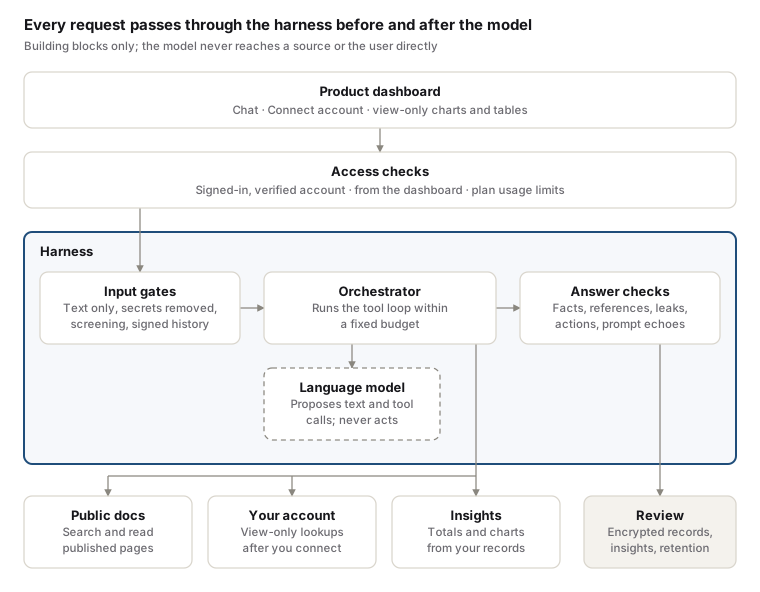
An AI assistant can be made safe by making the language model the smallest part of it. Everything around the model, the harness, decides what reaches it, what it may touch, and what the user finally sees.
A harness is the software wrapped around a model: input checks, the tools and knowledge it may use, the checks on its answers, access control, limits and review. The model proposes; the harness disposes.
In fintech the stakes are high. A wrong answer can send a payment to the wrong place, a leaked detail can expose a customer’s money, and every conversation sits under compliance rules. This post walks through the harness of an assistant built into the dashboard of a fintech platform. The assistant helps businesses do three things:
- Integrate the platform into their own systems, with step-by-step guides built from the public documentation.
- Troubleshoot API errors, payments and webhooks in plain language.
- Understand their own activity through view-only lookups, charts and tables, once they have connected their account.
It describes the harness at the level of its building blocks and the order they run in, for engineers and product teams building AI assistants of their own. It deliberately leaves out anything that would help someone attack it.
Design principles
Five principles shaped every part of the harness. When two of them pull against each other, the safer one wins.
| Principle | What it means in practice |
|---|---|
| Grounded, not remembered | Facts about the platform come from its published documentation; facts about an account come from that account’s records. The model’s general memory is never the source of a platform-specific claim. |
| Least privilege | The assistant can read, never write. It cannot move money, add customers or change settings, and it only sees the account of the person asking, after they consent. |
| Code checks the model | Prompts guide the model; deterministic code enforces the rules. A rule that matters is checked in code, before and after the model, whatever the model was told. |
| Fail closed | When a check cannot confirm something, the assistant says it could not confirm it, rather than guessing. Errors produce a safe reply, never a partial one. |
| The user stays in control | Account access needs explicit consent, ends with the session, and can be withdrawn at any time. Answers show their sources so users can verify them. |
Architecture at a glance
The harness surrounds the model on both sides: nothing reaches the model unchecked, and nothing the model writes reaches the user unchecked.
Life of a question
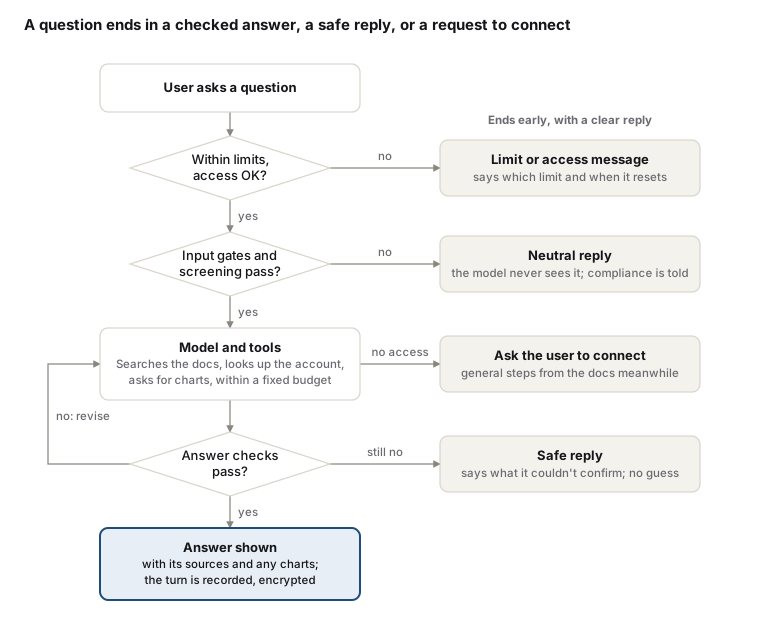
Every question takes the same path, and every exit gives the user a clear reply: an answer, a reason it stopped, or what to do next.
Input defences
Every message is treated as untrusted data until it has passed four gates. None of them depend on the model.
- Text only. The assistant accepts plain text messages. Files, images and attachments are refused before anything else runs.
- Normalise. Text is normalised so that hidden or disguised content is treated the same as plain content.
- Remove secrets. Credentials, tokens, keys and card numbers that a user pastes by mistake are removed before the model or any log sees them.
- Refuse payloads. Messages that carry code meant to run, markup or injection attempts are refused with a neutral reply and reviewed by the compliance team.
Two further protections apply to the whole conversation, not just the newest message:
- Screening. Each question is screened for attempts to misuse the assistant or reach data that isn’t the user’s. High-risk questions never reach the model.
- Signed history. The conversation the browser sends back is checked. Earlier assistant replies only count if they carry the server’s signature, so nobody can plant a fake “assistant” turn to steer the next answer.
Grounding and tools
The model answers from two sources only, and each is reached through a narrow, purpose-built tool rather than open access.
| Source | What the assistant can do | What it cannot do |
|---|---|---|
| Public documentation | Search the published docs and read whole pages, then cite them | Read anything unpublished or internal |
| The user’s own account | Look up the user’s own records, view-only, once connected | Change anything, see another account, see full personal details |
| Activity insights | Ask for counts and totals over a period, returned with a ready-made chart or table | Produce chart figures itself |
Three rules keep tool use safe:
- An allowlist, checked twice. Only tools that are approved and marked read-only are offered to the model, and the same check runs again when a tool is called.
- Tool output is data. Results are labelled as data, never instructions, before the model sees them.
- Charts are drawn from records, not words. Statistics and charts are computed by the platform from the account’s records and sent straight to the screen. The model only describes what the chart shows, so it cannot invent a number for one. Charts and tables in the chat are view-only.
Answer checks
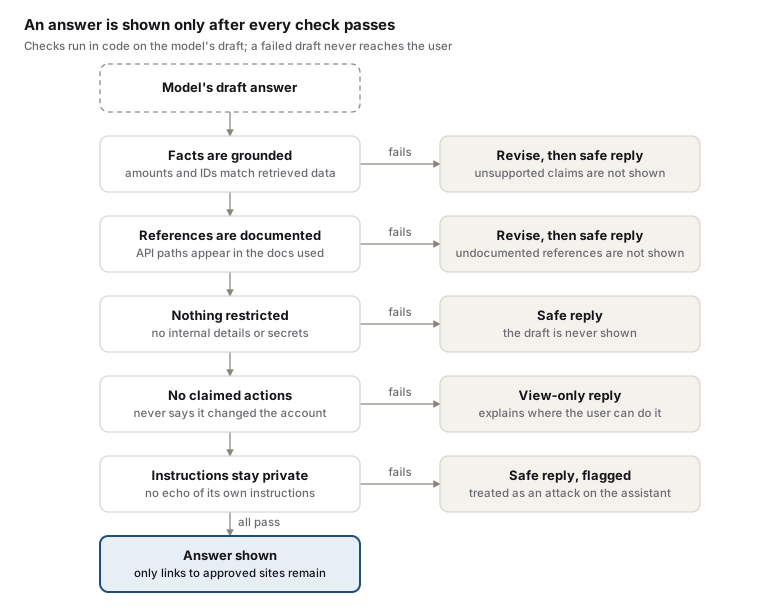
The model’s draft is a proposal. Checks in code decide whether it is shown, and each failure has a defined, safe way out.
Account access by consent
The assistant sees nothing of an account until its user approves view-only access, and that access ends with the dashboard session.
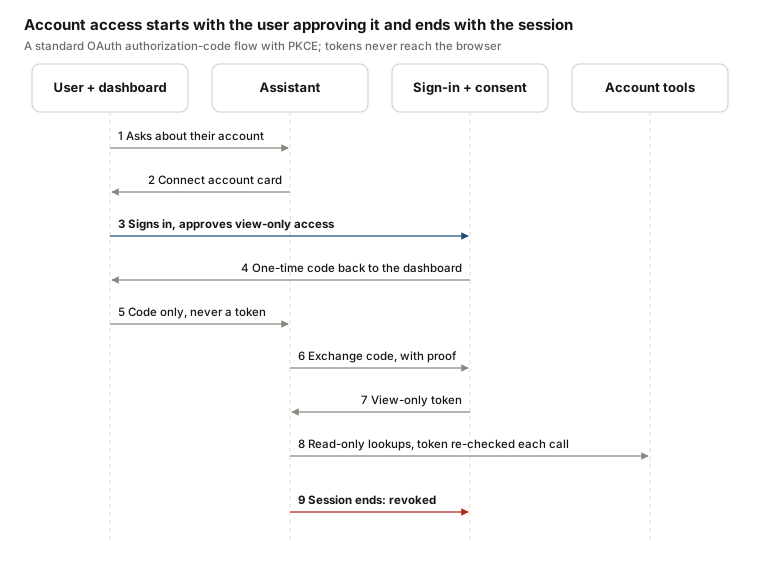
- Explicit consent. The user signs in on the platform’s own sign-in screen and sees exactly what is being granted: view-only access, nothing that moves money.
- Same person only. If the person who approves is not the person signed in to the dashboard, the connection is refused.
- Tokens stay server-side. The browser only ever carries a one-time code. The exchange uses a standard proof (PKCE) that only the harness holds.
- Checked on every use. Before each lookup the token is validated as it would be for any connected app, so a revoked token stops the assistant mid-conversation.
- Ends with the session. When the dashboard session ends, for whatever reason, access is revoked.
Fair use
Usage is limited per business by its pricing plan, so one account cannot crowd out others or run up cost.
- Limits apply over several windows at once, so they stop bursts and also bound total use.
- A team shares its business’s allowance.
- When a limit is reached, the user is told and given a time to try again. The assistant warns before that point.
- Plans can carry their own limits, so higher tiers get more without a code change.
These limits sit beside the platform’s ordinary request throttling, which still applies.
Review and improvement
Conversations are kept to meet compliance obligations and to make the product clearer. Users are told this before their first message.
- Encrypted records. Message content is encrypted. What analytics need (topic, outcome, whether a check fired) is kept as separate labels, so most insight work never decrypts a conversation.
- Insights. A review dashboard shows which services people ask about, where answers fall short, and the most common questions. A topic with many incomplete answers points to documentation or screens that need to be clearer.
- Retention. Conversations are deleted after a set retention period.
Lessons for building your own harness
The most useful lesson was that most failures were in the harness, not the model. One malformed tool description made every answer fail, and it looked like the model refusing to help.
- Decide the sources first. List exactly where facts may come from, and make the model fetch them through tools. Anything outside that list is a guess.
- Give tools the smallest power that works. Read-only, scoped to the requesting user, with an allowlist the code enforces. Prefer a tool that returns an answer (totals, a chart) over one that returns raw records.
- Put rules in code as well as in the prompt. The prompt explains intent; code enforces what must hold. Assume any instruction can be talked around.
- Check the answer before the user sees it. Compare claims against what was retrieved, give the model a chance to fix a problem, then fall back to a safe reply.
- Treat the conversation as input. Validate every turn the client sends, not only the latest one, and sign what the server said.
- Make access explicit and short-lived. Ask for consent, tie access to the session, and revoke it automatically when the session ends.
- Fail closed and say so. “I couldn’t confirm that” is a good answer. A confident wrong one is the worst outcome.
- Validate your tool schemas against every provider you might use. Small format differences between providers can break every request at once.
- Log for learning, protect what you log. Encrypt content, keep analytics on labels, control who can read records, and set a retention period.
- Test the attacks, not just the happy path. Keep a suite of jailbreaks, injections, fabricated facts and expired sessions, and run it on every change.